Installing ZEN core

- The installation of ZEN core and other components is performed using the ZEISS Microscopy Installer. Download the ZEISS Microscopy Installer in the ZEISS Portal from the Download Center under https://portal.zeiss.com/download-center/softwares/mic.
- Do not install an older ZEN core version over a newer ZEN core version. If ZEN core is already installed on your PC, uninstall the current version first.
- Depending on your PC configuration, the system requests an optional restart at the beginning of the installation.
- In exceptional cases, the system requests a restart at the end of the installation. If this is the case, a message will be displayed. This restart is required for the successful camera driver installation. You may postpone the restart until all components selected in the ZEISS Microscopy Installer are installed. After restart of the computer, reopen the ZEISS Microscopy Installer to install remaining components.
- In case of installing ZEN core on a SEM system, make sure that SmartSEM is not running when installing ZEN core.
- You have read the chapter Configure security software attentively.
- You have opened the ZEISS Microscopy Installer with admin rights and you are logged in.
- Your system is connected to the Internet.
- You have selected (default setting) the online installation, see ZEISS Microscopy Installer manual. If your system is not connected to the Internet, also see ZEISS Microscopy Installer manual.
- Open the Install tab, and on the left, select ZEN core with the respective version number (e.g. 3.12).
- The following dialog is displayed.
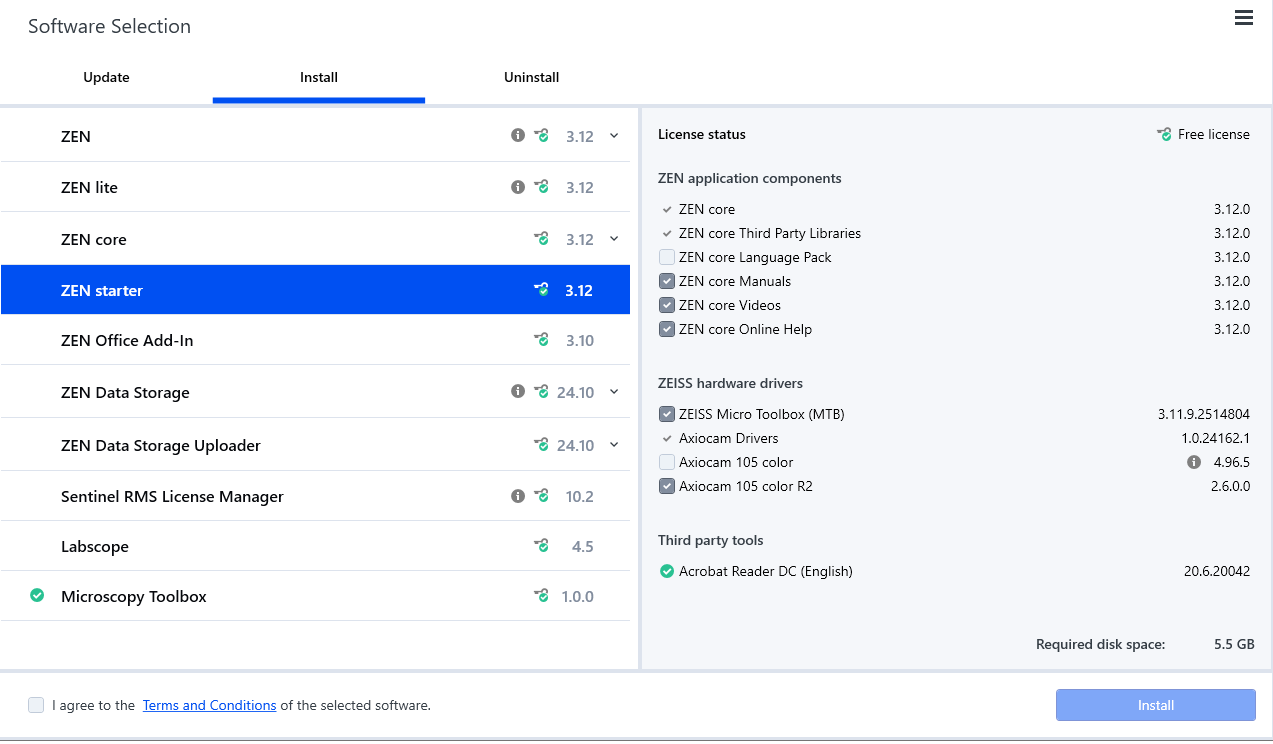
- On the right side, activate all components you want to install.
Always install the MTB when your system is connected to hardware. Select ZEISS hardware drivers > ZEISS Micro Toolbox (MTB). For updates of ZEN core Visioner 3.1 or 3.2 to higher versions, also install the MTB.
Note that if the 3rd party Python Tools are not installed, the following functionality will not work: Intellesis, Intellesis Object Classification, and Intellesis Denoising. Additionally, you need the 3rd party Python Tools to run a model trained by one of these modules.
In the Tools and accessories group, check which of the sample images are relevant for your modules: For TCA, TCA Small Sample Images (ZEN core) must be installed. Otherwise, the TCA workflows with loaded image will not work. The NMI Big Sample Images (ZEN core) are necessary when analyzing images in "real" sample size. The TCA Object Classification Images (ZEN core) should be installed if the AI Toolkit is licensed.
- If Docker Desktop is not installed, you cannot use containerized features like AI models for instance segmentation. For installation information, see Installing Docker Desktop with ZEISS Microscopy Installer.
- Activate I agree to the Terms and Conditions of the selected software and click Install.
- The selected components are downloaded and installed. A progress bar shows the progress of the installation.
- In case a software product or a software component requires a reboot, a message appears informing you that you need to reboot your computer.
- Click Close to exit the ZEISS Microscopy Installer.